
Jumpshare Review: Features, Pricing, and Free Alternatives
Jumpshare's free plan allows 25 uploads (250 MB max) for life. A documentation-based review of its features and pricing — and when a free file-to-URL tool fits better.

Jumpshare shows up in two different searches. Some people want a review of the screen-recording suite it has become; others just want to know if its free plan will share their file. Both questions have a concrete answer, and they point in different directions depending on what you actually need the link to do.
Disclosure up front: we operate AnyToURL, a file-to-URL tool that appears in the comparison below, so weigh that as you read. We hold both options to the same criteria and cite Jumpshare's current published plans and pricing (accessed October 15, 2026) throughout.
What Jumpshare actually is
Jumpshare started as a file-sharing service, but its current product center of gravity is an AI-powered screen recorder with a video hosting and marketing platform attached. The vendor's own materials put it plainly: video recording, sharing, and marketing are the core of the product, with more than 1 million users and a 4.9/5 average rating it reports from user reviews. Screenshots and GIF capture are supporting tools, and general file sharing remains available across every plan.
The capability list is long because the product spans a workflow, not a single task:
- Native screen recording on macOS and Windows (plus a Chrome extension, a browser-based recorder, and an iPhone app), with webcam, system audio, annotation, and no watermark on any plan.
- Built-in video editing — trim, split, join, custom thumbnails — in the same app where you recorded.
- Jumpshare AI on Business plans and above: automatic titles, transcriptions and captions in 50+ languages, summaries, chapters, and generated tasks or SOP docs from a recording.
- Video marketing tools: clickable call-to-action buttons inside the player, lead capture before or after playback, branded players, and custom domains on paid plans.
- Screenshot and GIF capture with a full annotation toolkit and one-click redaction of emails, passwords, and card numbers.
- Team features: timed comments, version history, shared libraries, analytics, and workspace-level privacy controls.
On trust: every plan serves shared links over SSL, the desktop apps are native rather than Electron wrappers, and Enterprise adds SAML SSO with a 99.99% uptime guarantee. Those are documented controls, not a security audit — but nothing in the product is hidden behind vague claims.
Is Jumpshare free? The Basic plan's real limits
Yes — Jumpshare has a permanent free plan called Basic, and it is a real plan, not a trial. But the caps are firmer than most people expect when they search for "jumpshare free":
- 25 uploads total. Not per month — the free plan allows 25 uploads before you need a paid plan.
- 250 MB maximum file size on each of those uploads.
- 5-minute screen recordings at 1080p, and 15-second GIFs.
- Included: screenshot capture, video markups, timed comments, basic search, Slack integration, and SSL-secured sharing.
What the free plan does not include matters just as much: password-protected links, expiring or self-destructing links, viewer analytics, call-to-action buttons, custom branding, 4K recording, and any API access all arrive with the paid tiers. Jumpshare does not publish a total storage cap for Basic — the operative limit is the 25-upload count.
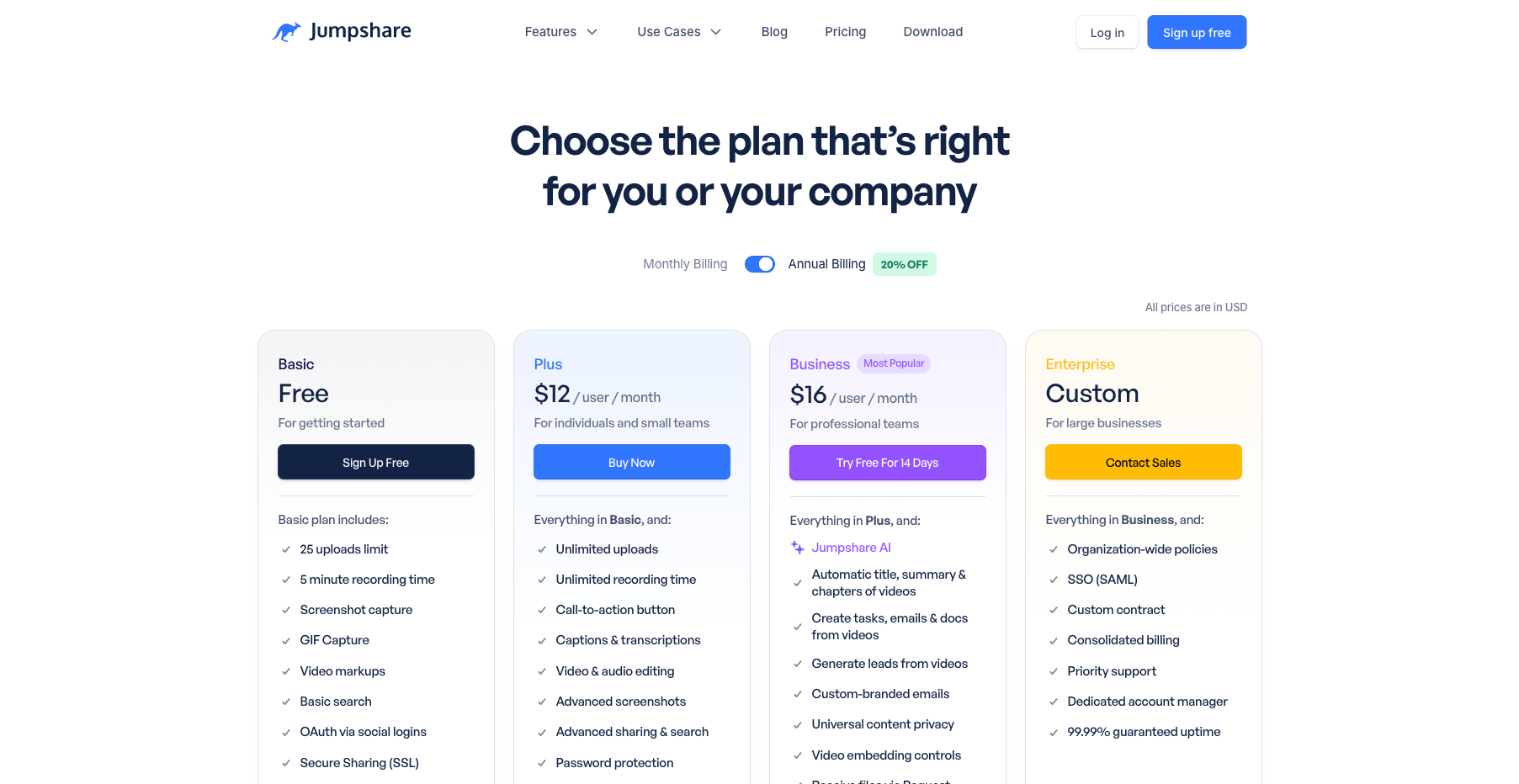
Jumpshare's published plans and pricing, accessed October 15, 2026 (source: jumpshare.com/pricing)
For light, occasional sharing, 25 lifetime uploads can last a long time. For anyone sharing files as a routine — client deliverables, rendered videos, datasets — it is a wall you hit sooner rather than later.
Jumpshare pricing: what paid plans actually add
Paid Jumpshare is priced per user, with annual billing roughly 20% below monthly:
| Plan | Annual | Monthly | What it unlocks |
|---|---|---|---|
| Plus | $12/user/mo | $15/user/mo | Unlimited uploads and recording length, up to 4K, 60-second GIFs, 10 GB max file size, password protection, expiring links, analytics, custom domain, captions |
| Business | $16/user/mo | $20/user/mo | Everything in Plus, plus Jumpshare AI, lead capture, branded emails, Zapier |
| Enterprise | Custom | Custom | SAML SSO, organization policies, 99.99% uptime SLA, dedicated support |
Storage and bandwidth scale with team size rather than sitting at fixed caps. Plus starts at 2 TB of storage and adds 250 GB per extra user; Business starts at 3 TB and adds 500 GB per user. Monthly bandwidth is 250 GB per user on Plus and 500 GB on Business — and it only counts views by other people, resetting on the first of each month.
The per-user model is the part to run the math on. A three-person team on Plus annual pays $432/year; Business is $576/year. For a team that lives in recorded video communication, that buys a genuinely deep product. For a team that mostly needs to move files, it prices per seat rather than per need.
What Jumpshare does well
Judged as what it now is — an async video communication suite — Jumpshare is strong on paper:
- The recording workflow is genuinely integrated: capture, trim, brand, and share from one native app, with the link ready when recording stops.
- No watermark on any plan, including free — rare in this category.
- The marketing layer (CTA buttons, lead capture, engagement analytics) turns recordings into sales assets, which is exactly what its sales and marketing use cases need.
- The AI layer on Business (auto titles, transcriptions, chapters, generated docs) targets the real cost of async video: the recipient's time.
If your team's shared artifacts are recordings, this is a coherent, well-specified product.
Where it fits file-sharing-first users less well
The same design shows its shape if your job is "I have a file; I need a link":
- You create an account and, for the full workflow, install a desktop app before your first link exists. The web app works, but the product is built around the recorder.
- The free plan's 25-upload lifetime cap treats sharing as an occasional companion activity, not a workflow.
- 250 MB max file size on free — fine for screenshots and documents, small for video files, and the 10 GB ceiling requires a per-user subscription.
- There is no free automation: API access and tools like Zapier start on paid tiers, so scripted uploads are off the table until you pay per seat.
None of these are flaws for the product Jumpshare is trying to be. They are mismatches for the reader whose need starts and ends with a URL.
Same criteria: Jumpshare vs a free file-to-URL tool
A file-to-URL tool answers the narrower question directly: upload a file, get a public link. AnyToURL is one of these — drag a file in the browser, and a shareable link appears in seconds, no account required for a first upload. Files are served over an edge network, images and PDFs preview inline, and Starter is free without a credit card.
Held to the same six criteria:
| Criterion | Jumpshare | AnyToURL (file-to-URL) |
|---|---|---|
| Core job | Record → host → market async video | Turn an existing file into a URL |
| First link | Account required; best flow via desktop app | Browser upload, no signup before first link |
| Free plan shape | 25 uploads lifetime, ≤ 250 MB each, persistent library | 5 MB per file, 24-hour retention, 1 GB uploads/month, 1 GB bandwidth/day |
| Size ceiling | 250 MB free → 10 GB on Plus ($12–15/user/mo) | 5 MB free → 1 GB on Pro ($9.9/mo) → 10 GB on Ultra ($29.9/mo) |
| Sharing controls | Passwords, expiry, self-destruct, analytics (Plus+) | Public link; file history and deletion; permanent retention on paid tiers |
| Automation | None on free; Zapier on Business+ | API and CLI from Pro ($9.9/mo), 60–300 uploads/min by tier |
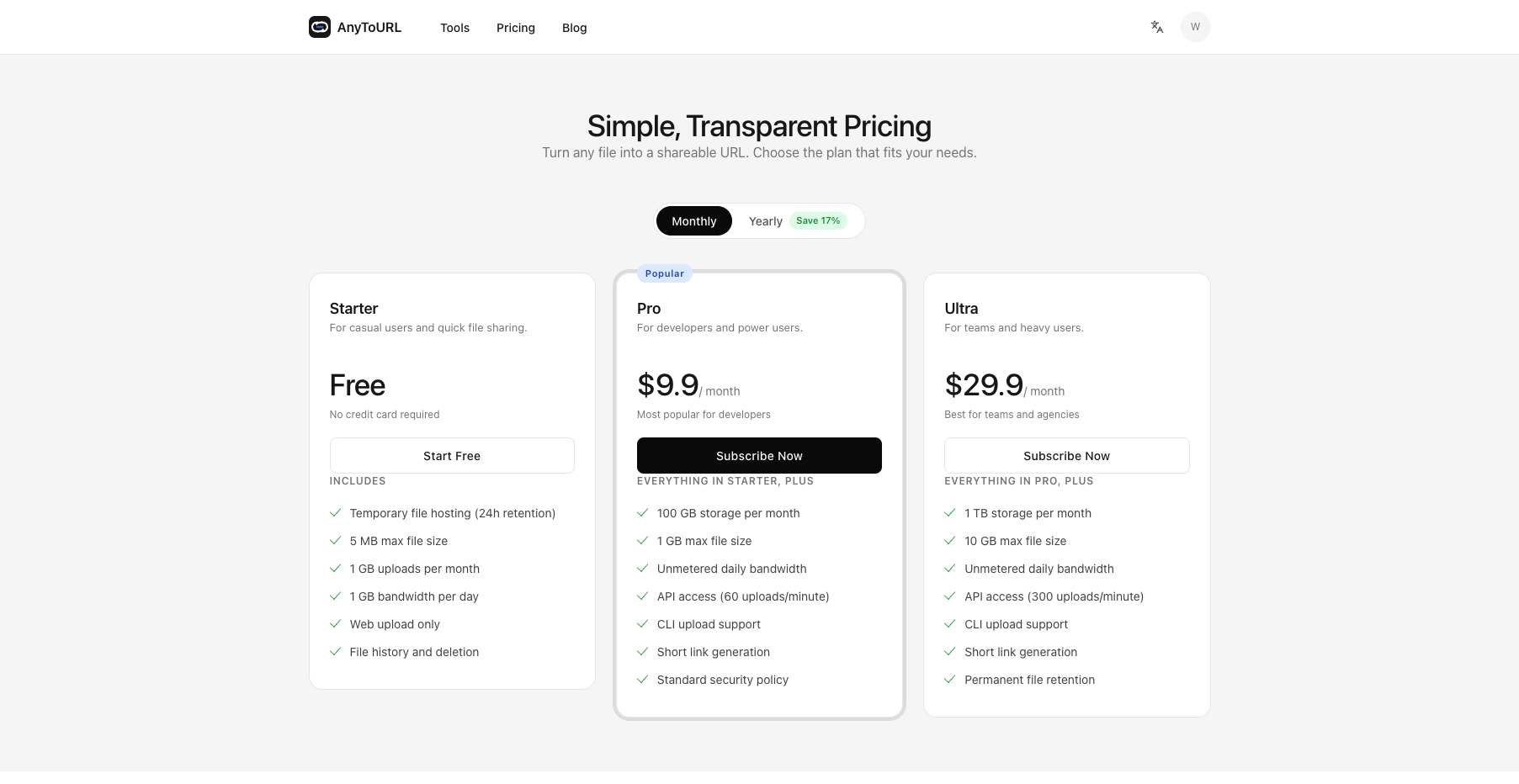
The structural difference is the free plan's shape. Jumpshare free is a capped persistent library: 25 files, up to 250 MB, staying put until you hit the count. AnyToURL free is a metered conveyor: small files, 1 GB a month, links that expire after 24 hours. One suits "share a document now and again"; the other suits "move files constantly without thinking about a lifetime counter." Neither is strictly better — they are different budgets.
When Jumpshare is the better choice
- Your team communicates through recorded video — demos, walkthroughs, reviews — and wants recording, editing, branding, and analytics in one native app.
- You need the marketing layer: CTA buttons, lead capture, viewer analytics on shared videos.
- A persistent, organized library of visual assets matters more than upload counts.
- You want AI-generated titles, transcriptions, and chapters (Business) as part of the workflow.
When a free file-to-URL tool is the better choice
- Someone is waiting for a file right now — a PDF, a render, an export — and you don't want an account or an app install in the way.
- Your file is larger than Jumpshare's free 250 MB cap, and you'd rather pay $9.9/month flat for a 1 GB ceiling (or $29.9 for 10 GB) than a per-user seat.
- The share belongs in a script or pipeline — API and CLI uploads from $9.9/month, with no seats to count.
- The link is ephemeral by design: a 24-hour link with automatic expiry is a feature when you're passing something temporary, not a limitation.
That last block is AnyToURL's whole job. If it matches yours, you can test the entire flow with one free upload.
Try AnyToURL free — drag a file, get a link →
The verdict
One question settles it: is the link the deliverable, or is the recording the deliverable?
Jumpshare is a capable, honestly specified async video suite — worth its per-user price for teams whose shared artifact is a branded, measured recording. Its free plan is real but built to demonstrate that workflow, with a 25-upload lifetime cap and a 250 MB ceiling that file-heavy users will hit quickly. If what you need is the file itself, delivered as a link — quickly, without an account, or from a script — a dedicated file-to-URL tool does that job on a free tier, and AnyToURL scales it by need rather than by seat: Pro, at $9.9/month, costs less than a single Jumpshare Plus seat and already includes API and CLI uploads, while the 10 GB ceiling (Ultra, $29.9/month) costs more than one seat but covers a whole team's sharing without counting seats.
Try AnyToURL free — upload once, see the link →
Plan details for Jumpshare reflect its published pricing and plans as of October 15, 2026; AnyToURL's limits come from its live pricing page. Both change — check before you buy.