
Share Text Online: What "The URL Is the App" Actually Means
How the "URL is the app" pattern behind Bigwords.page works, when a self-contained URL beats a hosted paste, and how to share text online with a link you control.

You can share text online as a link in about a minute: sign up free on a text-to-URL service, paste the words, and it hands back a URL anyone can open in a browser — no attachment, no app, and nothing for the recipient to install. The idea got a loud vote of confidence in early October 2026, when Bigwords.page — a tiny open-source project that turns a link into a full-screen sign — reached 694 points and 160 comments on Hacker News under a bold slogan: "The URL is the app."
The slogan is catchy, and it is also slightly imprecise in a way that matters when you are choosing a tool. There are two different shapes of "text becomes a URL": the message can live inside the link itself, or the link can point at content stored somewhere. They solve different problems, and picking the wrong one gets you either an unwieldy link or a message that vanishes too soon. This article explains how both shapes work, where each one breaks, and walks through the hosted-paste version end to end.
Key takeaways
- "The URL is the app" means all the content or configuration needed to render something travels inside the link. Bigwords.page does this by storing the message in the URL fragment, so there are no accounts, no backend, and nothing stored on a server.
- Self-contained URLs shine for short, transient messages you show on screens you control: signs, timers, Wi-Fi cards.
- A hosted text paste produces a short, clean link to content stored by a service — the better shape when the text is longer than a line or two, the link will be pasted into chats or QR codes, or you want expiry and deletion controls.
- With AnyToURL, a free account is all the setup there is: the Text tab accepts up to 1 MB of pasted text, free links last 24 hours, and paid plans keep content permanently while the subscription is active. Recipients never need an account.
What "the URL is the app" means
Bigwords.page started with a practical annoyance. Its author wanted to display a message on a tablet he managed remotely but could not physically reach. Turning it into a kiosk browser was easy — but how do you tell that browser what to show? His answer: "I made the URL be the message."
Mechanically, everything the page displays lives in the URL fragment — the part after the #. As the project's documentation puts it, "all state lives in the URL fragment," and browsers never send the fragment to a server. That single design decision produces the properties people upvoted:
- No accounts and no backend. "Nothing is stored anywhere," and the project is open source under the MIT license.
- The server never sees your message. Since browsers do not transmit the fragment, the service never sees or logs it.
- One static page serves every possible display. Changing the fragment updates the screen without even reloading the page.
The result is a link like https://bigwords.page/#Welcome%20home that renders as a giant, auto-fitted sign on any screen — phone, tablet, laptop, or TV. The documented use cases are all in that family: an arrivals sign at an airport, a quiz countdown, a café Wi-Fi card with a QR code, an "ON AIR" light, a room sign that says meeting in progress.
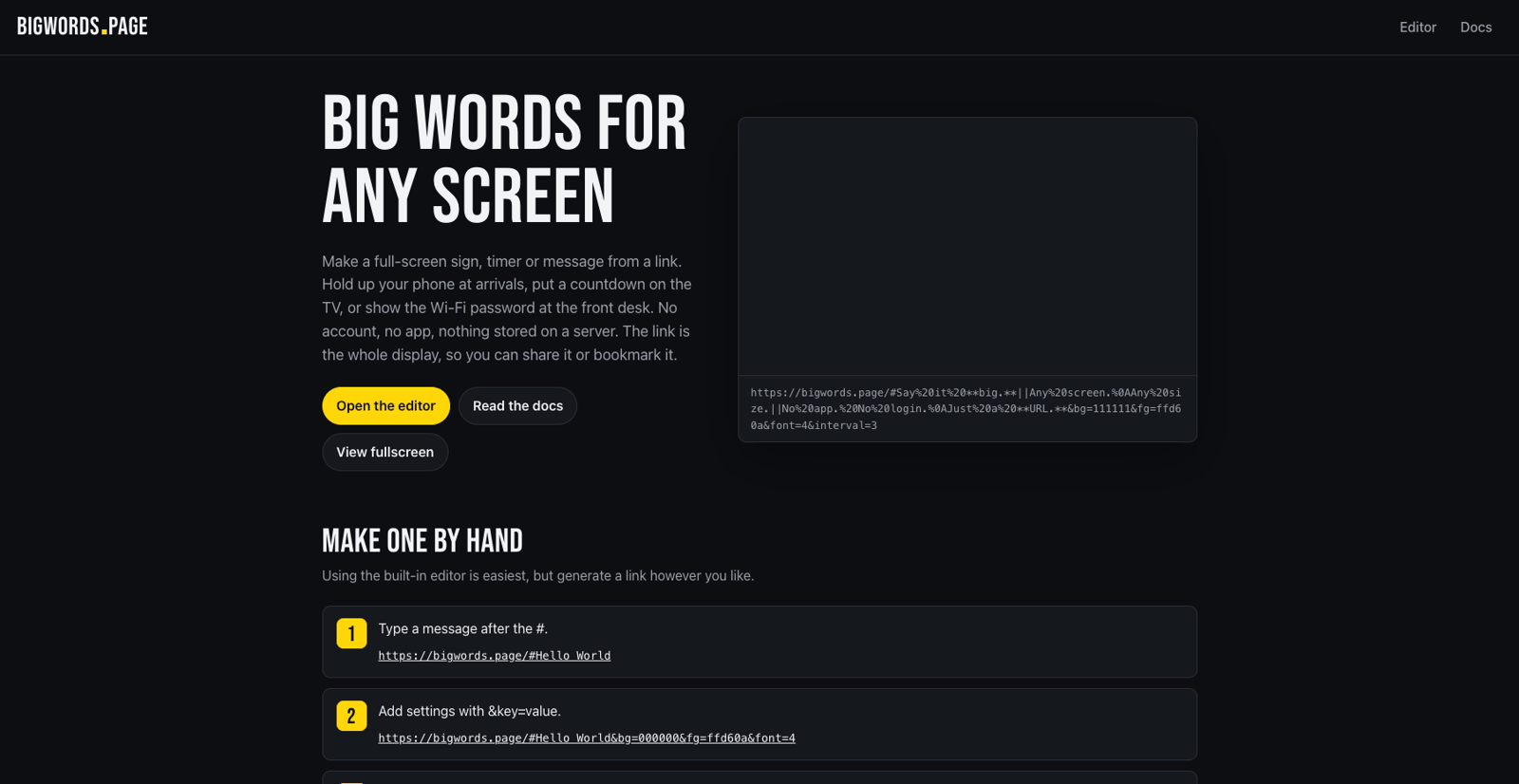
Source: bigwords.page, accessed October 9, 2026.
Not everyone on Hacker News bought the slogan, and the pushback is instructive. "We used to call them websites," one commenter quipped; another offered the sharper reading: "The URL is the state, but clearly there is an actual app here." Both are right in a useful way. Bigwords is an app — a real renderer with fonts, slides, and timers — but the state it renders lives entirely in the URL you carry around. That is the actual pattern: not "no app," but "nothing to install, nothing stored, the link carries everything."
The two shapes of a text URL
Once you see the pattern, you notice text-as-URL services come in exactly two shapes:
| State-in-URL (e.g. Bigwords.page) | Hosted text paste (e.g. AnyToURL) | |
|---|---|---|
| Where the content lives | Inside the link itself (URL fragment) | On the service's servers |
| Link shape | Long — content is percent-encoded into the URL | Short and clean |
| Practical size ceiling | A sentence or two of signage | Documents of text — 1 MB on AnyToURL |
| Persistence | As long as someone keeps the link | Controlled by the service's retention policy |
| Expiry control | None needed — nothing is stored | Explicit windows, e.g. 24 h free / permanent on paid plans |
| Privacy posture | The server never sees the content, but every copy of the link is the content | The service holds the content, so its deletion and expiry controls matter |
| Best for | Showing messages on screens you control | Sending text to other people |
Neither shape is "the right one." They optimize for different failures. A state-in-URL link can never leak from a server breach, because there is nothing on the server — but paste that link into a group chat and you have pasted the message itself, #-encoded, for everyone to read in the URL bar. A hosted paste gives you a tidy one-line link that behaves in chats, QR codes, and documents — but now a server holds your words, so the service's retention rules become part of your privacy decision.
When a hosted text link is the better pick
Reach for a hosted text paste — the "link points at content" shape — when any of these is true:
- The text is longer than a line or two. Instructions, a code snippet, meeting notes, a Wi-Fi password plus network name. Encoded into a URL, they become an unreadable mess; nobody wants to tap a 900-character link.
- The link has to survive the conversation. A self-contained link works only while someone still holds the exact string. A hosted link keeps working after the chat scrolls away — which is also its risk, addressed below.
- The link will be printed or encoded. QR codes, slides, handouts, and email signatures all favor short, stable URLs.
- You want control after sharing. Expiry windows and deletion give you an ending for the content — something a fragment in someone's bookmark can never have.
This job — "paste text, get a link to share" — has been around far longer than this month's Show HN post, which is why the durable search wording for it is things like share text online or a pastebin alternative. What has changed in 2026 is that the hosted-paste shape now sits next to a genuinely working state-in-URL shape, and picking between them is a real decision rather than a default.
Share text online with AnyToURL
AnyToURL's primary task is exactly this: turn a file, text paste, or long URL into a shareable URL. For text:
- Create a free account at anytourl.com — no credit card; the Starter plan is free. Signing in with Google or GitHub takes a click.
- Switch to the Text tab. The home page offers three modes — File, Text, URL — and the Text tab is the paste tool.
- Paste or type your content. The Text tab accepts up to 1 MB of text, which covers anything from a one-line password to full meeting notes.
- Create the paste and copy the link. Send it anywhere — chat, email, a document, a QR code. Recipients open it in a browser without creating an account.
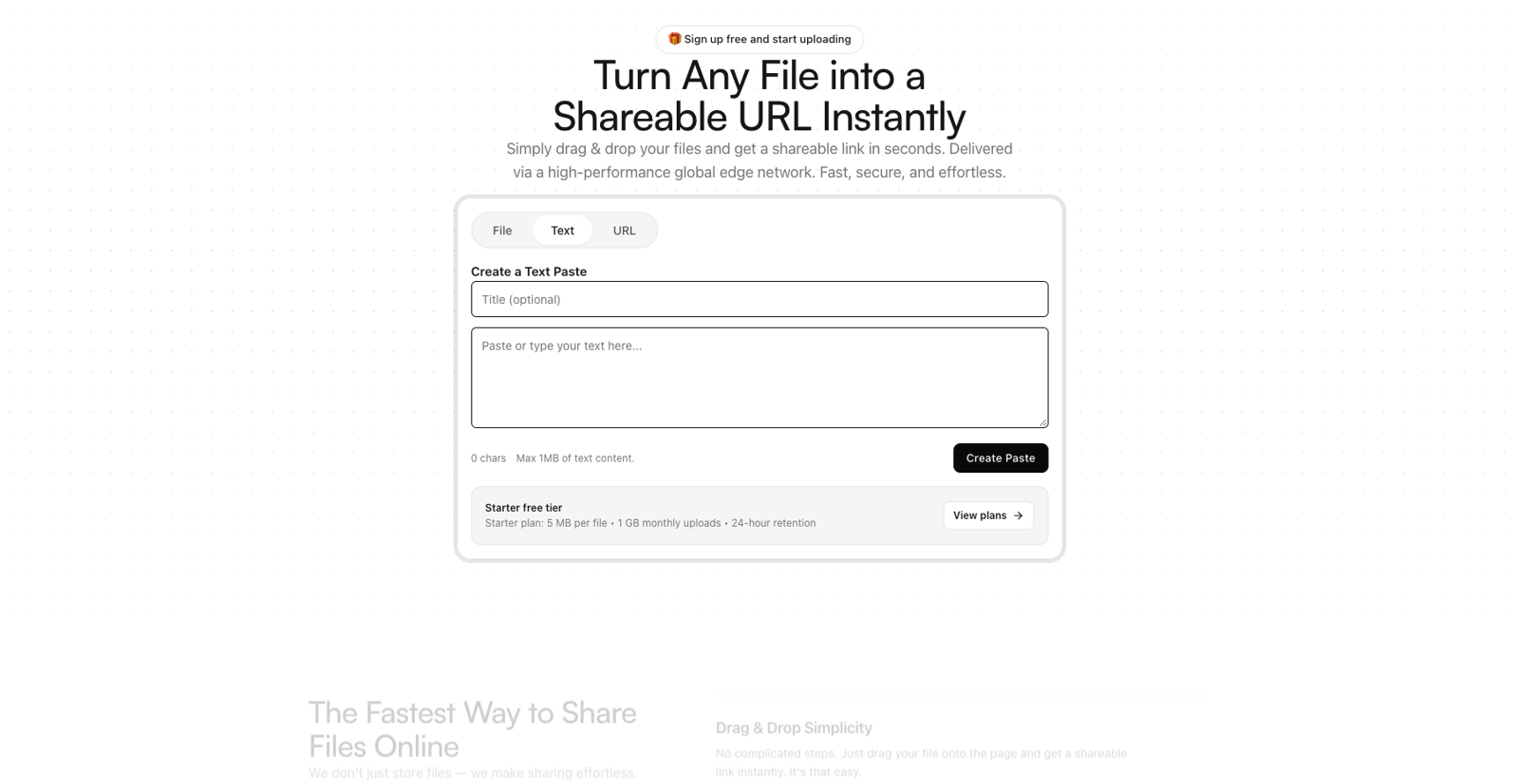
The one decision worth making consciously is how long the link should live. On AnyToURL's free Starter plan, text pastes expire after 24 hours; Pro and Ultra content has permanent retention while the subscription is active. That default is a feature if you think about it: most pasted text is conversation-scoped — a password, an address, a quick answer — and a link that dies on its own is one less thing your rotation hygiene has to catch.
Want to try it? Sign up free on AnyToURL, switch to the Text tab, and you have a link in seconds.
Which shape is right for your privacy
The privacy mechanics are already in the table above — the short version is that fragment apps never give the server anything to leak, while hosted pastes trade that for clean links plus retention controls. What matters in practice is matching the tool to the content: passwords, addresses, and anything sensitive belong in a paste with a short expiry window, not in a permanent link or a URL you might paste into a public channel. And when you pick a hosted-paste service, expiry and deletion controls are not nice-to-haves — they are the actual privacy mechanism.
FAQ
Is sharing text as a link free? Both shapes have free options. Bigwords.page is open source and stores nothing, so there is nothing to pay for. AnyToURL's Starter plan is free with 24-hour retention; paid plans add permanent retention and higher limits.
How long does a text link last? A state-in-URL link lasts as long as someone keeps the string. A hosted paste lasts as long as the service's retention policy — 24 hours on AnyToURL's free plan, permanently on active paid plans.
Is a text link private? It depends on the shape. Fragment-based apps never send the content to a server, but the content is visible in the link itself. Hosted pastes keep URLs clean but store the content, so the service's retention and deletion controls are the privacy mechanism that matters.
Is this just a pastebin alternative? For the hosted shape, essentially yes — modern text-to-URL services compete with classic pastebins on link cleanliness, expiry control, and previews. Fragment-based apps like Bigwords are a different category: they are signage, not drop-boxes.
The bottom line
"The URL is the app" is a memorable slogan for a real pattern: links that carry everything needed to render something, with no install and nothing stored. For messages you display on screens you control, a state-in-URL tool like Bigwords.page is a delightful fit. For text you are sending to other people, a hosted paste is the shape that survives chats, QR codes, and time — and gives you an expiry switch. Pick by three questions: How big is the content? Where will the link travel? When should it stop working?
Ready to turn text into a link? Try AnyToURL free — paste, create, share.