
GIF to URL: How to Share an Animated GIF as a Link
Turn an animated GIF into a shareable link in minutes: what a GIF URL preserves (frames, timing, loop), where it auto-plays — Discord, docs, forums — and when a link beats an attachment.

You finished a reaction GIF, a product demo loop, or a screen recording saved as an animated GIF. Now what? Attaching it to a chat compresses or size-caps it, and half your audience uses apps where the file never lands cleanly. The reliable move is to turn the GIF into a URL: upload it once, get a direct link, and paste that link anywhere images render — Discord, a README, a forum post, a doc.
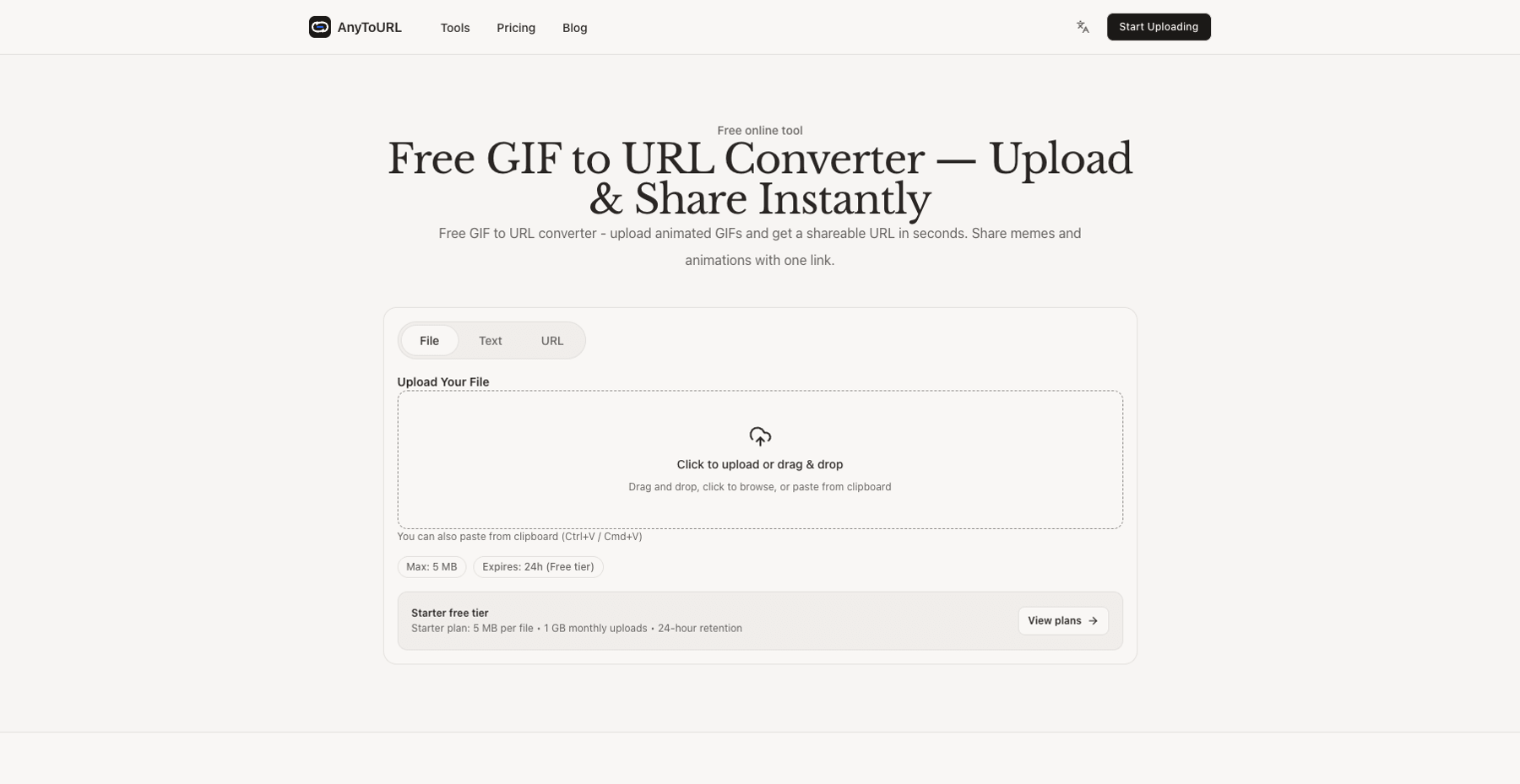
Here's the short version. A GIF to URL converter hosts your animated GIF and gives you a link that points straight at the file. On AnyToURL's GIF to URL tool, a free account gets you links for GIFs up to 5 MB, kept online for 24 hours (limits checked November 1, 2026); paid plans keep GIFs up to 1 GB or 10 GB online permanently while the subscription is active. The GIF is stored exactly as uploaded — no re-encoding — so every frame, timing, and loop setting arrives intact.
This guide walks through the conversion, explains what a GIF link actually preserves, shows where links autoplay versus fall back to a static image, and helps you decide between a free 24-hour link and permanent hosting.
Why a link beats sending the file
Sending an animated GIF as an attachment works until it doesn't:
- Attachment size caps. Discord, for example, only accepts picture uploads under 10 MB without Nitro, and its limits are actively changing, per Discord's own support docs. Email and some messengers are stricter.
- Re-compression. Apps that do accept GIFs often process them to save space, and quality or looping can suffer. You don't control what the platform does to the file.
- One file, many destinations. The same animation usually needs to go into a chat thread, a README, and a ticket or doc. A link pastes into all of them; an attachment has to be re-sent to each.
- Discord's GIF picker isn't the answer for your own file. The GIF picker built into Discord searches an online library of existing GIFs, per Discord's docs. Your own animation — a demo of your app, a bug reproduction, an inside joke rendered at 3 a.m. — has to be uploaded or linked.
A link sidesteps all of this: the platform fetches the file from the URL when it renders the message, so what viewers see is your original GIF, served from a CDN rather than squeezed through another app's encoder.
How to turn a GIF into a URL
The workflow below follows AnyToURL's published tool behavior (documentation-based; product limits re-checked November 1, 2026).
- Open the GIF to URL tool and sign in with a free account. No credit card needed.
- Add your GIF. Drag and drop the file, browse for it, or paste it straight from your clipboard (Ctrl+V / Cmd+V). On the free Starter plan the file can be up to 5 MB, with 1 GB of uploads per month.
- Copy the link. You get a direct URL served from a global CDN, so it loads at similar speed for viewers in different regions.
- Test it before sharing. Open the link in a browser tab and confirm the animation plays the way you expect. Then paste the URL wherever you need it — a chat, an issue comment, a Markdown doc.
That's the whole conversion. Nothing happens to the file itself in this flow — which is exactly the point, and worth a closer look.
What stays intact: frames, timing, loop
An animated GIF isn't one image; it's a stack of frames stored in a single file, each with its own delay time — that's the design of the GIF87a/GIF89a formats. Playback speed and looping come from the file itself, not from the player. This matters for two practical reasons:
- No transcoding means no surprises. AnyToURL stores your GIF byte-for-byte as uploaded, without re-encoding, so every frame, timing, and loop setting is preserved. The animation your teammate sees in Discord is the same file your README loads.
- The format is forgiving. Standard GIF87a and GIF89a files are supported, with no restrictions on dimensions — from a 16×16 icon to a full-HD capture. The only constraint is file size.
For scale: a typical 3-second reaction GIF at 480p runs around 1–3 MB, which fits comfortably in the free tier. Screen recordings and high-resolution loops grow fast past that — more on handling oversize GIFs in the FAQ.
One honesty note: "preserved" describes the hosting, not every app's rendering. AnyToURL serves the original file; it can't stop a chat app from scaling an image down to fit the window or a viewer from turning animations off.
Where a GIF link works — and what viewers see
Discord. Paste the URL into a message and Discord shows a link preview that displays the image — official behavior, documented by Discord. For your own animations this is the path the built-in GIF picker can't cover. Keep in mind some users run Discord's Reduced Motion setting, so animation isn't guaranteed for every viewer.
READMEs and Markdown docs. GitHub renders standard Markdown image syntax, so a direct GIF URL drops into a README as  and plays inline. This is the standard trick for animated examples in project docs, where attaching a file isn't an option at all.
Web pages. An <img> tag pointing at your GIF URL embeds the animation anywhere HTML renders, with natural looping.
Forums and other IMs. Most places that render inline images will play a linked GIF, but behavior varies: some apps compress pasted images or show a static frame. The reliable habit is to paste the link, send it to yourself or a test channel, and look before it matters.
Link or attachment: a quick decision table
| Situation | Better choice | Why |
|---|---|---|
| GIF is small and goes to one person, once | Attachment | Fastest path; no hosting to manage |
| GIF exceeds the chat's attachment cap | Link | AnyToURL free handles up to 5 MB; paid plans up to 10 GB |
| Same animation goes to chat and docs and a README | Link | One URL, paste everywhere |
| The animation belongs in documentation | Link (permanent) | Attachments aren't an option in a README |
| You may need to update or pull the animation later | Link | Delete or replace the file at the source; the old link dies instead of living in someone's downloads |
| Platform re-compresses attachments | Link | The original file is served untouched |
How long the link lives: free vs. paid
This is the decision that actually bites people. Free links are active for 24 hours from upload; after that the file is removed and the image stops loading. Fine for a reaction in tonight's thread — a time bomb for a README.
The tiers, checked November 1, 2026:
| Starter (free) | Pro — $9.9/mo | Ultra — $29.9/mo | |
|---|---|---|---|
| Max file size | 5 MB | 1 GB | 10 GB |
| Retention | 24 hours | Permanent while subscribed | Permanent while subscribed |
| Monthly uploads | 1 GB | 100 GB storage | 1 TB storage |
| Daily bandwidth | 1 GB | Unmetered | Unmetered |
Two nuances worth knowing before you choose:
- Bandwidth is the hidden limit on free hosting. A GIF embedded on a busy page gets fetched by every visitor. The Starter plan includes 1 GB of bandwidth per day; a popular embed can exhaust that. If the animation lives in product docs or a README people actually read, paid hosting with unmetered bandwidth is the realistic option.
- "Permanent" means while the subscription is active. Pro and Ultra keep your files as long as the plan is live — a fair, explicit trade, but not a promise of lifetime free hosting, which no honest host makes.
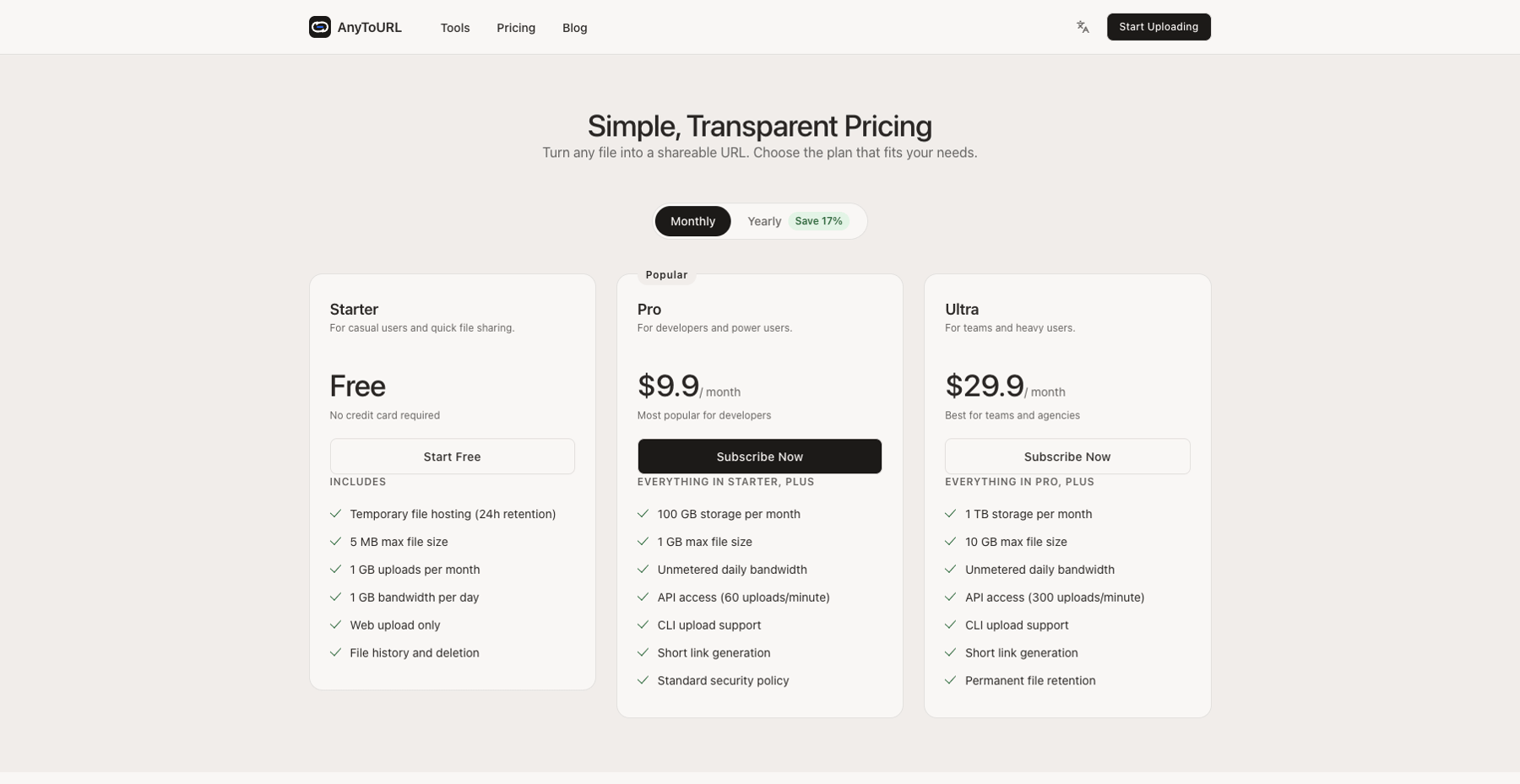
AnyToURL plans, checked November 1, 2026
FAQ
Is hosting a GIF free? Yes, on the Starter plan: files up to 5 MB, 1 GB of monthly uploads, kept online for 24 hours. A free account is all it takes — no credit card. Paid plans add larger files, higher quotas, and permanent retention.
Will my animation be preserved? The file is stored exactly as uploaded, without re-encoding, so frames, timing, and loop settings are all intact. What individual apps display can still vary (scaling, reduced-motion settings).
How long does the GIF link last? Free links stay active 24 hours from upload, then the file is removed. Pro and Ultra keep content permanently while the subscription is active.
Can I put a GIF link in a README?
Yes. GitHub renders Markdown image syntax, so  embeds and plays the animation inline. Use a permanent link for anything documentation-shaped.
My GIF is over 5 MB. What now? Either optimize it — AnyToURL suggests tools like Gifsicle or Ezgif, which shrink GIFs by trimming frames and colors — or upgrade: Pro takes files up to 1 GB and Ultra up to 10 GB.
The takeaway
A GIF to URL converter turns "here, I'll send you the file" into "here's a link that plays anywhere." Upload the animation, copy the link, paste it where it needs to be seen — and pick your retention deliberately: 24 free hours for a quick share, a paid plan when the link has to keep working inside something durable. If your file is a video rather than a looping GIF, the video sharing guide covers that workflow instead, and the PDF as link guide does the same for documents.